Open Source Drawdown Monitor Template
Know how much room you have left.
A daily loss-limit monitor that shows remaining headroom rather than P&L, escalates through defined states, and latches at the limit until you acknowledge it.
This is the real app, not a mockup. Whatever you enter in the demo stays in your browser and belongs to nobody.
What you get
One zip. Everything to own it.
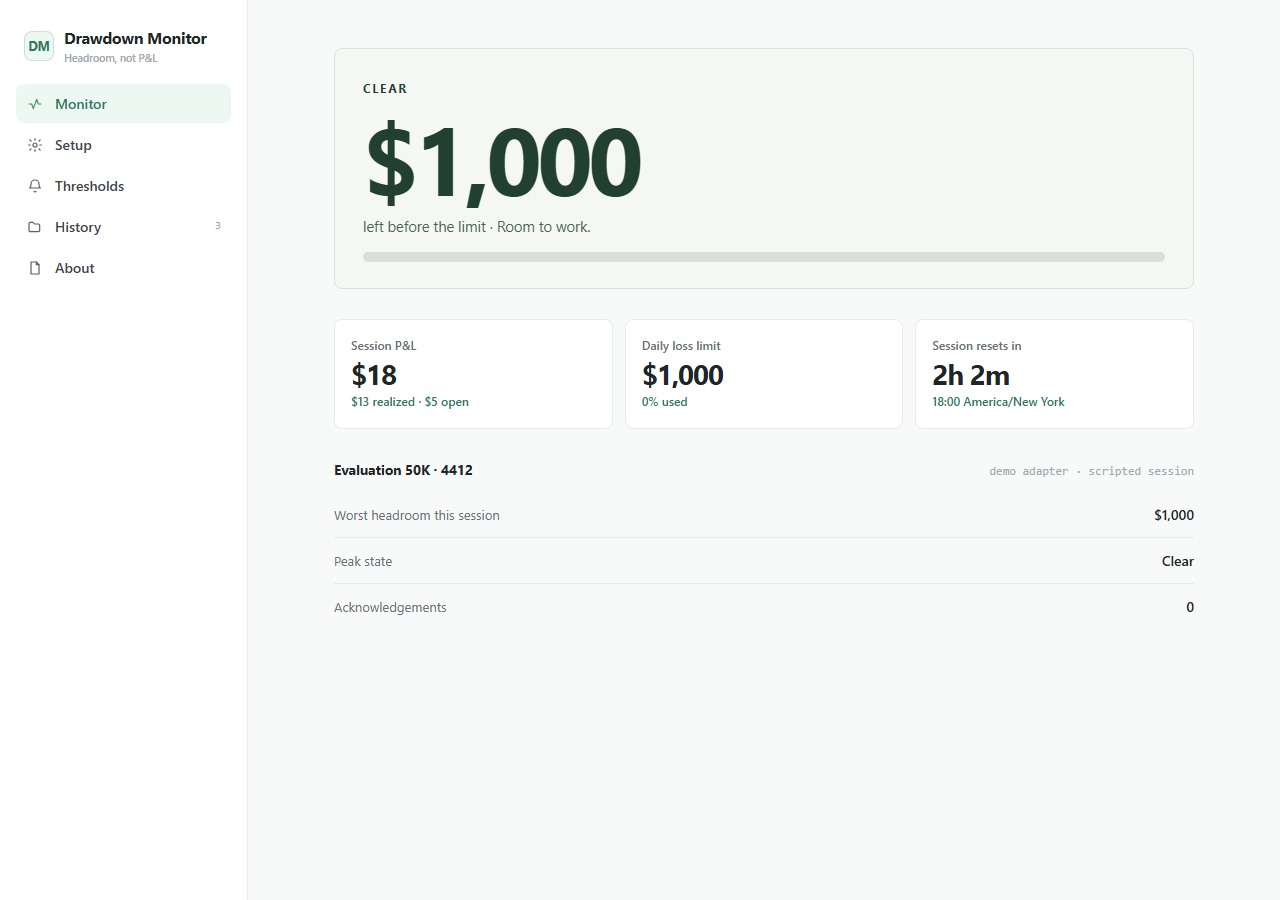
Funded accounts, prop-firm evaluations, and personal trading rules share one failure mode: the limit gets breached because nobody was watching the number. Drawdown Monitor keeps a single figure in front of you — how much you can still lose today — and escalates as it drains. The primary number is headroom, not P&L, because "down $588" needs arithmetic under stress and "$412 left" does not. Two behaviours carry the whole design. Stop latches: once you hit the limit the alert stays until you acknowledge it, even if the number recovers, because an alert that clears itself is one you learn to wait out. And no-link is a state rather than an error toast, because a stale screen that looks calm is the most dangerous thing a risk monitor can show you. Sessions reset on your account's own cutoff in its own timezone — prop firms reset at 5 or 6pm US Eastern, not your local midnight, and getting that wrong makes the app confidently wrong at exactly the wrong moment.
- Remaining headroom as the primary figure, not P&L
- Four-state escalation with user-editable thresholds
- Stop latches until acknowledged, then goes steady rather than off
- No-link is a first-class state after 45 seconds of adapter silence
- Session boundary in the account's own timezone, not local midnight
- Demo and manual adapters, with a documented interface for broker adapters
- Synthesised alert tones, off by default, and reduced-motion honoured
drawdown-monitor/├── app/the running Next.js app├── agent/START_HERE, PROJECT_MAP, RULES, RECIPES, TESTS, DEPLOY├── CLAUDE.mdread automatically by Claude Code├── AGENTS.mdread automatically by Codex├── .cursor/rules/loaded automatically by Cursor└── README.mdrun it, then make it yours
Inside the app
Customize with AI
Your agent already knows this codebase.
Ships with CLAUDE.md, AGENTS.md, Cursor rules, and a full agent handbook — project map, safety rules, recipes, tests, and deploy notes.
Prompts written against this app
Run it
5 min to your own copy.
- 01Create your editable app copy and unzip it.
- 02Run npm install.
- 03Run npm run dev and open http://localhost:3000.
- 04Set your loss limit, session reset time, and timezone before anything else.
- 05Read /agent/START_HERE.md before customizing — several constraints here are deliberate.
Drawdown Monitor data stays in this browser by default.
No account, backend, or cloud sync is included in the current package.
An agent can add optional sync later while preserving the local-first default.
This package is standard-ready for Create My App and AI customization.
A full app-only PWA install route is not enabled yet for this app.
Questions people ask
No. It is read-only by design — there is no order placement, position modification, or auto-flatten anywhere in the codebase, and broker adapters should use read-only API scopes. An app that can close your positions is a different product with a different liability profile.
It ships with a demo adapter and a manual adapter, and the manual one works with every broker on earth — you type the P&L and the app does the rest. No live broker adapter is included, because shipping one that could not be tested here would be a claim rather than a feature. The BrokerAdapter interface is documented in the package and adding one is a well-scoped change.
Nowhere. There is no server and no account. Settings and session history live in your browser. If you add a broker adapter, its credentials are stored locally and used only for calls from your own machine to your broker.
Because the moment the number matters is the moment you are least able to do arithmetic. "Down $588 against a $1,000 limit" is a subtraction; "$412 left" is not.
No. It reports one number against a limit you set. It does not suggest trades, size positions, or evaluate a strategy, and it is not a substitute for your broker's own risk controls. Trading involves risk of loss.
If this isn’t quite right
Take Drawdown Monitor and make it yours.
Free, MIT, 5 min to running. The demo above is exactly what lands in your folder.