Open Source Notion-Style Workspace Template
Open source Notion-style pages, databases, publishing, and embeds.
An open source Notion-style workspace template for nested pages, block-style documents, lightweight databases, publishing, embeds, self-hosting, and AI customization.
This is the real app, not a mockup. Whatever you enter in the demo stays in your browser and belongs to nobody.
What you get
One zip. Everything to own it.
Foundation Workspace is the first pass at an open source Notion-style workspace for Foundation Base: a clean, local-first app shell with nested pages, a modern block-style editor surface, simple database tables and lists, publishing controls, read-only embeds, Markdown/CSV/JSON portability, and self-hosting docs. It is built for searches around open source Notion alternatives, self-hosted workspaces, Notion-style app templates, and AI-customizable productivity software while staying honest about scope: the current package is a stable local-first template, and the docs show how to grow it into a PostgreSQL, Prisma, Auth.js, Tiptap, and Yjs-backed workspace after the non-realtime version is stable.
- Open source Notion-style workspace shell with nested pages and clear app ownership
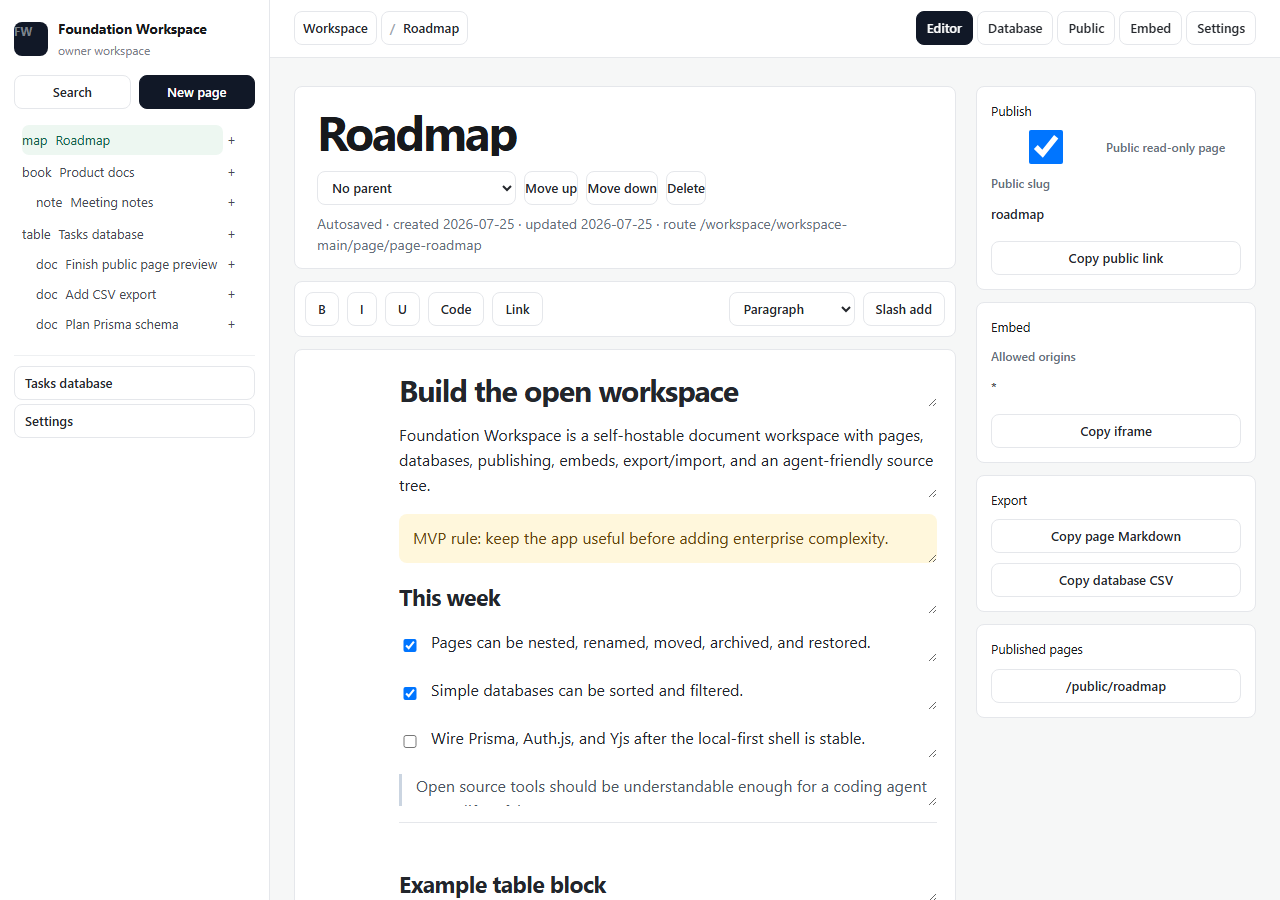
- Nested pages with rename, parent changes, ordering, archive, and restore
- Autosaved block-style editor with slash-add blocks and move/delete handles
- Lightweight database table/list views with properties, rows, sort, and filter
- Public-page publishing and read-only iframe embed preview
- Markdown, CSV, and workspace JSON portability
- Self-hosting docs for Docker Compose, Vercel/Netlify-style frontend hosting, and future PostgreSQL
- AI-coding-agent docs for expanding into Prisma, Auth.js, Tiptap, and Yjs
foundation-workspace/├── app/the running Next.js app├── agent/START_HERE, PROJECT_MAP, RULES, RECIPES, TESTS, DEPLOY├── CLAUDE.mdread automatically by Claude Code├── AGENTS.mdread automatically by Codex├── .cursor/rules/loaded automatically by Cursor└── README.mdrun it, then make it yours
Inside the app
Customize with AI
Your agent already knows this codebase.
Ships with AGENTS.md, CLAUDE.md, Cursor rules, README, customization docs, deploy notes, security notes, and route stubs for the requested workspace/public/embed paths.
Prompts written against this app
Run it
10 min to your own copy.
- 01Create your editable Foundation Workspace source copy and unzip it.
- 02Run npm install.
- 03Run npm run dev and open http://localhost:3000.
- 04Read README.md, CUSTOMIZE.md, DEPLOY.md, SECURITY.md, and AGENTS.md before customizing.
- 05Add PostgreSQL, Auth.js, Tiptap, and Yjs after the local-first workspace flow is stable.
Current demo data stays in this browser by default.
The model names are aligned with the future Prisma schema.
Public and embed previews render only published page content.
This is a standard-ready advanced app template, not a full Notion clone.
PostgreSQL, Auth.js, Tiptap, and Yjs are documented as expansion steps rather than required for the static catalog demo.
Questions people ask
No. Foundation Workspace is a first working open source workspace template with nested pages, a block-style editor surface, lightweight databases, publishing, embeds, and portability. It is designed to become a larger Notion alternative over time without claiming every Notion feature on day one.
Yes. The package includes local setup docs, Docker Compose scaffolding, deploy notes, and a self-hosting path. The current demo is local-first and static-catalog friendly, with PostgreSQL, Prisma, Auth.js, and realtime collaboration documented as expansion steps.
Yes. The template ships with AGENTS.md, CLAUDE.md, Cursor rules, README, customization docs, deployment notes, security notes, and clear model boundaries so Codex, Claude Code, Cursor, or another coding agent can safely modify it.
Yes. The first version includes nested pages, an autosaved block-style editor, table and list database views, public read-only pages, iframe embed previews, Markdown export, CSV export, JSON backups, Markdown import, and CSV import.
If this isn’t quite right
Take Foundation Workspace and make it yours.
Free, Apache-2.0, 10 min to running. The demo above is exactly what lands in your folder.