CRM · Private relationship tracker

Free Personal CRM App

Remember the relationship context that makes the next conversation more thoughtful.

Personal CRM is a lightweight relationship tracker for individuals, freelancers, and consultants. Add people, record their company and tags, log conversations, and set a specific date to follow up. This Foundationbase implementation keeps its contact and interaction records in the current browser, requires no account, and provides a source copy for changing the fields and reminder workflow.

  • No account required
  • Contacts stay in this browser
  • Dated follow-up queue
  • Interaction timeline
  • MIT licensed
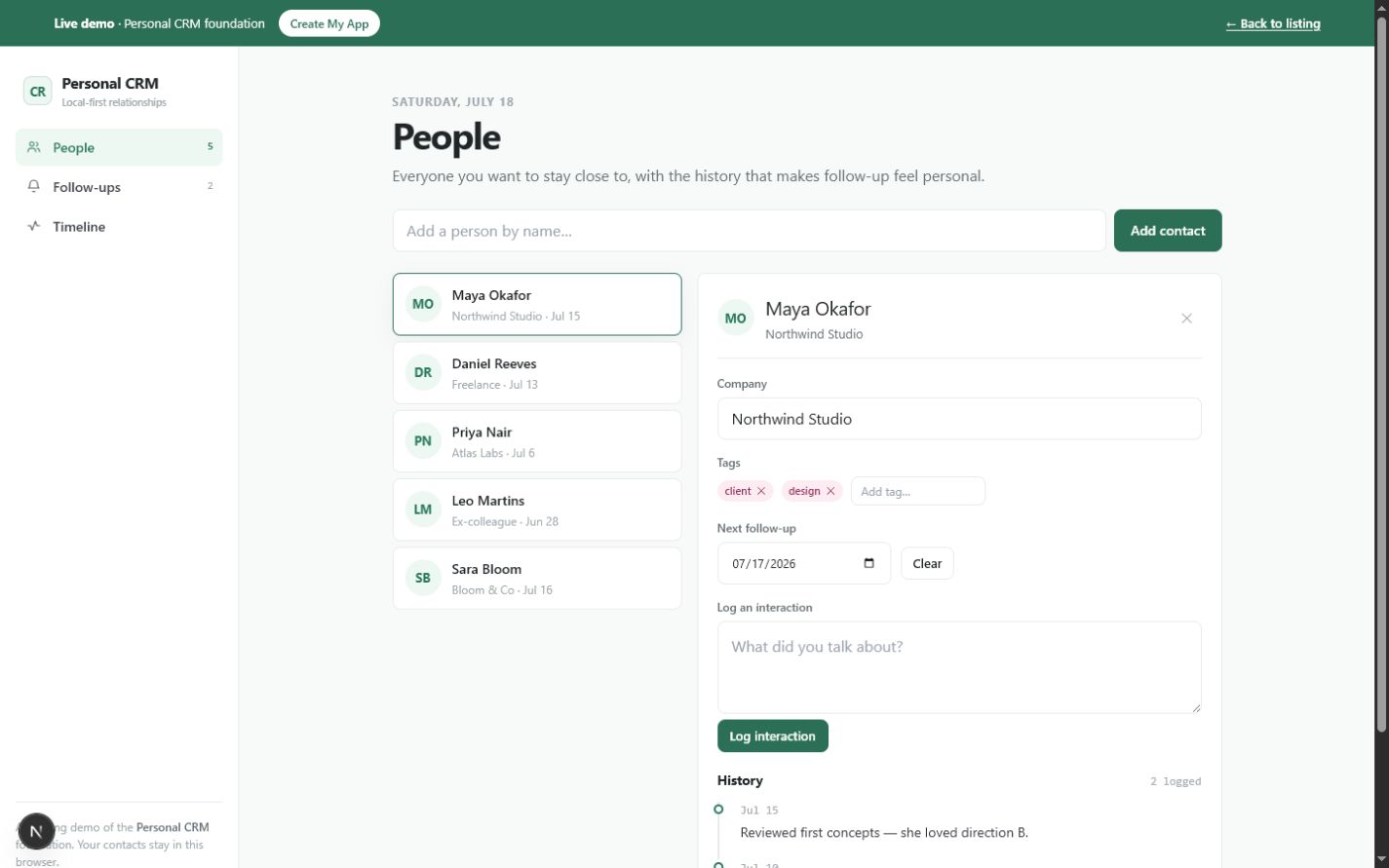
Personal CRM people view showing a contact list, selected relationship profile, company, tags, next follow-up date, and interaction historyOpen the working tool

Product preview

See Personal CRM in use

These screens come from the working Foundationbase implementation.

Personal CRM people view showing a contact list, selected relationship profile, company, tags, next follow-up date, and interaction history
People and relationship contextThe split view keeps the contact list beside the selected person's editable context and notes.
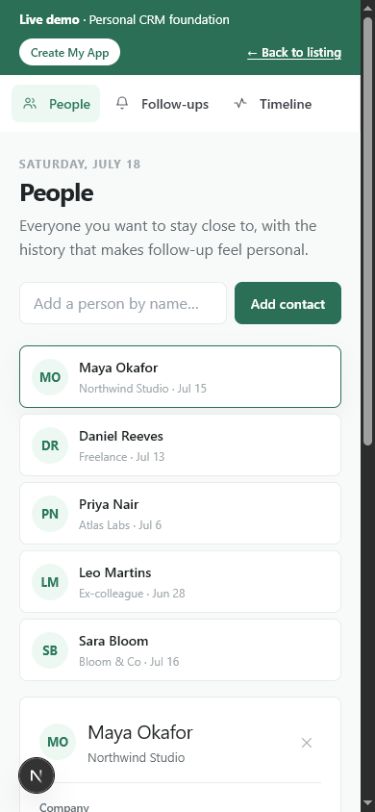
Mobile Personal CRM people view with contact capture, relationship list, and phone navigation
Relationship tracking on a phoneThe same contact and follow-up workflow adapts to a narrow screen without introducing a separate mobile data model.
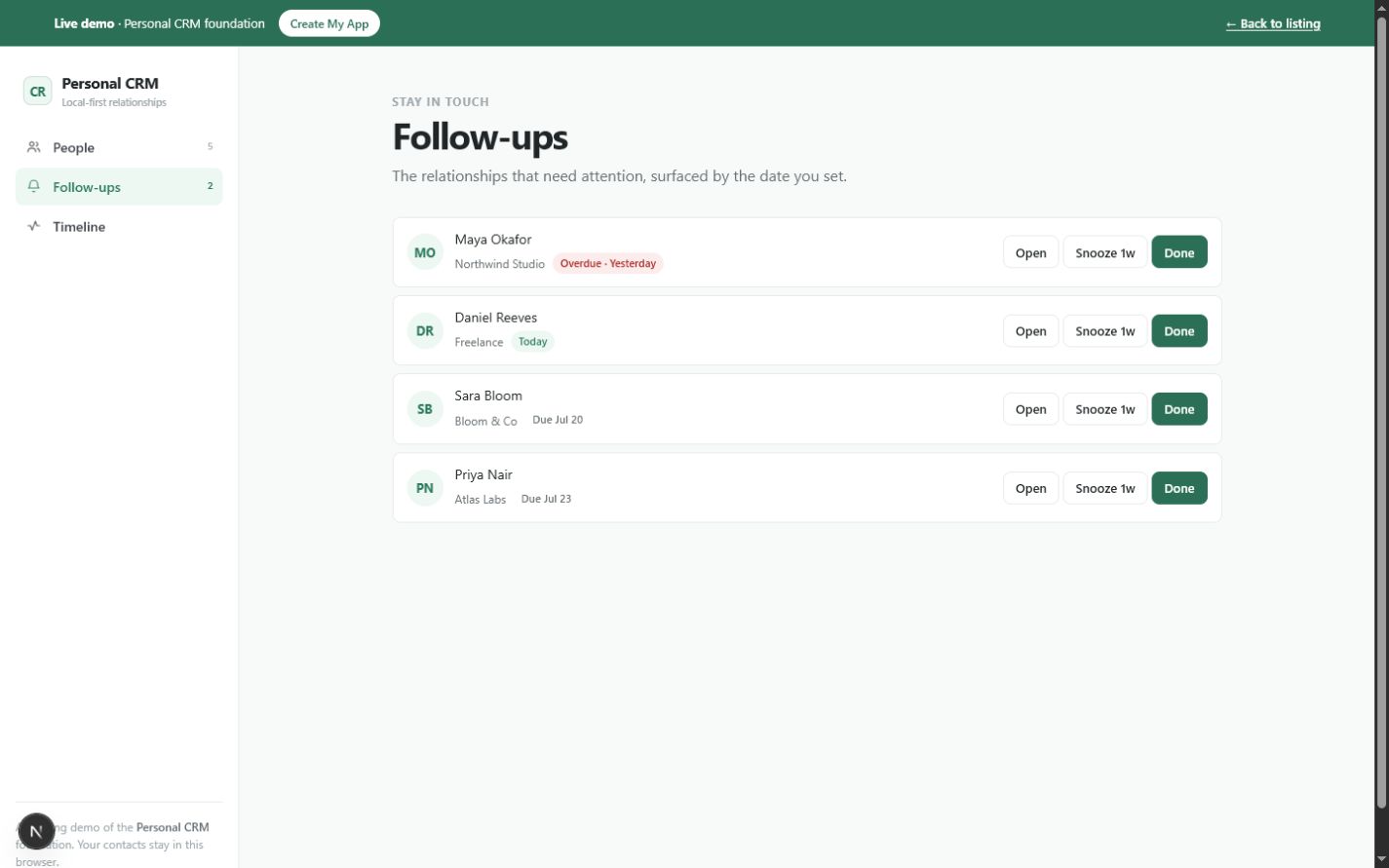
Personal CRM follow-up queue listing overdue, today, and upcoming contacts with Open, Snooze one week, and Done actions
Dated follow-up queueFollow-ups are sorted by the dates stored on contact records and can be opened, snoozed, or completed.

What this tool helps you do

A personal relationship memory and follow-up system

Phone contacts preserve names and numbers, but they rarely capture why a relationship matters, what happened in the last conversation, or when you intended to reconnect. A conventional sales CRM adds deal stages, team administration, and automation that may be unnecessary for a personal network.

Personal CRM keeps two linked record types: people and interactions. A person can carry a company, tags, and one next-follow-up date. Each logged note is attached to that person and also appears in a chronological timeline across all relationships.

  • Create a focused list of people you want to remember
  • Add company context and lightweight relationship tags
  • Record what happened in each conversation
  • Set, clear, complete, or snooze a follow-up date
  • See overdue, due-today, and upcoming relationships in date order
  • Review every logged touchpoint in one chronological timeline

What is included

Features grounded in the working tool

Simple contact records

Create a person from a name, then edit the company, tags, and next follow-up date in the selected profile.

Why it matters: The record captures relationship context without demanding a large sales schema.

Verified in: Contact type and PeopleView

Relationship tags

Add lowercase tags such as client, friend, prospect, design, or a label specific to your network; remove them directly from the profile.

Why it matters: A compact vocabulary makes relationships easier to recognize without imposing pipeline stages.

Verified in: ContactDetail tag editor

Per-person interaction log

Write a note after a call, meeting, or message. The app stamps it with today's date and associates it with the selected contact.

Why it matters: The next conversation can begin with the context of the last one.

Verified in: Interaction type and logInteraction

Follow-up dates

Assign one next-follow-up date to a contact, clear it when plans change, or open the dated queue to see every scheduled person.

Why it matters: Intentions to reconnect become visible work rather than memory alone.

Verified in: followUpOn field and FollowupsView

Overdue and due-today states

The queue compares each follow-up date with the current date and labels contacts as overdue, today, or upcoming.

Why it matters: Attention can start with relationships whose chosen date has already arrived.

Verified in: FollowupsView date comparisons

Snooze or complete a follow-up

Snooze moves the stored date forward seven days. Done clears the date and adds a 'Followed up.' interaction to that person's history.

Why it matters: Working the queue updates both future attention and the relationship record.

Verified in: snooze and markDone functions

Cross-contact timeline

The Timeline view sorts every interaction by date and displays the related person's name with the note.

Why it matters: You can scan recent relationship activity without opening contacts one by one.

Verified in: TimelineView

Local browser persistence

Contacts and interactions are serialized to one versioned localStorage key and restored when the same browser returns.

Why it matters: The demo works without an account or hosted database while keeping its data boundary easy to inspect.

Verified in: useLocalState and Foundationbase.personal-crm.v1

How it works

From a new person to the next thoughtful follow-up

This CRM is organized around the relationship loop implemented in its People, Follow-ups, and Timeline views.

  1. Add a person

    Enter a name in the People view. The new contact is selected immediately with blank company, tags, and follow-up fields.

    A minimal relationship record exists without a long form.
  2. Add context

    Enter the company and tags that help you recognize the person's role or relationship.

    The record becomes useful when names alone are not enough.
  3. Log the interaction

    Write what you discussed or what matters next. The note receives today's date and appears in the person's history.

    Conversation context is attached to the right relationship.
  4. Choose the next follow-up date

    Set a date on the contact profile. The person enters the global queue in chronological order.

    The intention to reconnect becomes actionable.
  5. Work the queue

    Open a due contact, snooze the date by one week, or mark it done. Completing it records a follow-up interaction automatically.

    The queue and timeline stay aligned.

Real use cases

Where this tool fits

Independent consultant relationship memory

For a consultant

Situation: Several clients and prospects matter, but an enterprise CRM would add more process than the work needs.

Workflow: Tag people by relationship, log important conversations, and schedule the next personal follow-up.

Outcome: Client context and next actions remain visible in a private, small system.

Conference and community follow-up

For a networker or community organizer

Situation: You meet useful people in bursts and need to remember the conversation after the event.

Workflow: Add each person, tag the event or community, record the discussion, and set a realistic reconnect date.

Outcome: New connections are less likely to disappear into an address book.

Freelance prospect tracker

For a freelancer

Situation: A full sales pipeline is unnecessary, but prospects still need notes and next-touch dates.

Workflow: Tag prospects, log calls, and use the follow-up queue for overdue and upcoming conversations.

Outcome: A sales-lite workflow stays centered on people instead of deal administration.

Family and personal relationship reminders

For an individual

Situation: You want a private record of last contact and future check-ins for a modest circle.

Workflow: Use relationship tags, short notes, and selected follow-up dates without company data where it is irrelevant.

Outcome: The same record model supports personal attention without pretending to be a social network.

Who it is for

A focused fit, with clear limits

Ideal for

  • Individuals with a deliberate relationship practice
  • Freelancers and consultants with a small client network
  • Community builders who need conversation context
  • Developers prototyping a personal or sales-lite CRM

Especially useful for

  • Remembering what happened in the last conversation
  • Keeping one dated next step per person
  • Snoozing follow-ups without losing the relationship history
  • Starting from a two-entity contacts-and-interactions model

Not the best fit if you need

  • Large-team permissions, assignment, and territory management
  • Automatic email, calendar, or address-book synchronization
  • Bulk CSV import or export in the current implementation
  • Multiple pipelines, deals, forecasting, and enterprise reporting
  • Regulated or highly sensitive customer records
  • Automatic synchronization between devices

Use it, install it, or make it yours

Choose the path that matches your goal

Use it now

Open the live CRM and work with the seeded contacts or reset the demo. New contacts, edits, notes, and follow-up actions are saved in this browser profile.

Create your copy

Download the source package to make an editable version. The core implementation is a small React client component plus shared local-storage and date helpers.

Customize it with an agent

A coding agent can add fields, filters, birthdays, a dashboard, or import/export. The current Contact and Interaction types are the factual starting point; import and cloud behavior do not exist until you add them.

Deploy your version

Publish the customized Next.js project to a compatible host and use its stable URL as your version. Add a backend only if the privacy, account, and synchronization tradeoffs are intentional.

Customization ideas

Change this tool without starting over

Personal CRM has an intentionally small model: contacts and interactions. That makes field changes approachable, but features such as import, multi-device sync, and reminders require real implementation rather than copy changes.

Simple customization

  • Rename company to organization or context
  • Change the default tag vocabulary and colors
  • Adjust the follow-up labels and empty states
  • Make the contact list denser or more visual

Functional customization

  • Add birthday and last-contact fields
  • Add search and tag filters to People
  • Add CSV export and a validated CSV import preview
  • Create a dashboard for overdue and upcoming follow-ups

Advanced customization

  • Send opt-in calendar reminders
  • Add encrypted account-based synchronization
  • Implement contact deduplication and address-book import
  • Add shared workspaces with roles and audit history

Prompts for Codex, Claude Code, Cursor, or another coding agent

Add a relationship follow-up dashboard to Personal CRM. Use the existing Contact.followUpOn field, group overdue, today, this week, and later, and do not change or discard existing localStorage data.
Add CSV export and import to Personal CRM. Export contacts and interactions separately, preview validation errors before import, preserve contactId relationships, and do not claim cloud sync.
Add birthday and preferred-contact-method fields to the Contact type. Migrate records loaded from Foundationbase.personal-crm.v1 when the fields are absent and keep the People, Follow-ups, and Timeline views working.

Technical details

Implementation facts

Framework
Next.js 15 and React 19
Language
TypeScript
License
MIT
Version
1.0.0
Storage
Browser localStorage, key Foundationbase.personal-crm.v1
Account required
No
Offline support
Not currently included as a verified PWA/offline package
PWA installation
Not currently included
Export format
No export or import control in the current implementation
External APIs
None in the current implementation
Mobile support
Responsive browser interface; mobile layout included in the pilot review
Last verified
July 18, 2026

Deployment options

  • A Next.js-compatible host
  • A compatible static deployment
  • Local development with npm run dev

Privacy and data behavior

What happens to your data

By default, Personal CRM stores contact and interaction records in localStorage for this browser. The component does not call a third-party API or require an account. That local boundary is useful for a small private list, but it is not automatic backup, encryption, or cross-device sync.

Stored data

  • Contact name, company, tags, next follow-up date, and creation timestamp
  • Interaction note, date, contact identifier, and generated record identifier

Storage and network

Location: One JSON state object in the current browser profile under Foundationbase.personal-crm.v1

Network: The current Personal CRM component performs no application data fetches. Normal site assets still load from the host serving the page.

Your controls

Delete: Delete individual contacts with confirmation; their linked interactions are removed too. Reset replaces the state with seeded sample data. Clearing site data removes the local record.

Export: No export or import method is included in the current implementation.

Data limitations

  • There is no backup or recovery workflow
  • Data does not synchronize between browsers or devices
  • localStorage is not presented as encrypted
  • Anyone with access to the same unlocked browser profile may be able to view the records
  • Reset restores sample data rather than an empty database

Verification and known limitations

Checked against the implementation

Checks

  • Contact, interaction, follow-up, timeline, and local-storage code inspected
  • Follow-up date ordering and one-week snooze behavior inspected
  • Contact deletion and linked interaction deletion inspected
  • No import, export, external API, manifest, or service-worker claim added
  • Production typecheck, build, route, structured-data, and responsive checks are part of the current pilot quality gate

Known limitations

  • No search or tag filter
  • No import or export
  • No account, backup, or multi-device sync
  • No actual notifications; follow-ups appear only when the app is opened
  • One next-follow-up date per contact
  • No team roles, deal pipeline, or company record entity

Foundationbase verification checks expected functionality, packaging, setup clarity, and common implementation concerns. It is not a professional security audit, accessibility certification, legal review, or guarantee of production suitability.

Comparison

Personal CRM versus a blank build or sales CRM

The meaningful comparison is the relationship model, follow-up behavior, and data boundary—not a generic list of productivity claims.

DecisionFoundationbase toolStarting from scratchGeneric alternative
Contact modelName, company, tags, next follow-up, and created timeYou decide fields, validation, and editing flowOften includes many sales and organization fields
Interaction historyDated notes linked to a contact and global timelineRequires linked records and sortingMay include email and call automation
Follow-up workflowOne date per person with open, one-week snooze, and doneYou define states and date behaviorOften tasks, sequences, and team assignments
Import and exportNot included in the current appCan be designed for exact sourcesCommonly available with provider-specific mapping
Data locationOne browser localStorage recordYou choose local or remote architectureUsually provider-hosted cloud data
CollaborationSingle-browser, single-user behaviorCan be designed around a teamUsually central to the product
CustomizationMIT source and a small inspectable domain modelMaximum freedom but no working flowLimited to fields and settings exposed by the vendor

FAQ

Questions about Personal CRM

Is Personal CRM free?

Yes. The live tool is free to use, and the downloadable source is listed under the MIT license. Check the license included with your copy before redistributing a modified version.

Where are my contacts and notes stored?

They are serialized to localStorage in the current browser profile under Foundationbase.personal-crm.v1. The current component does not send those records to an application backend.

Can I import contacts from a CSV or address book?

No. Import is not implemented in the current app, despite older catalog copy describing an import-ready direction. It is a reasonable customization, but it needs mapping, validation, duplicate handling, and interaction-link preservation.

Does Personal CRM send follow-up reminders?

It does not send operating-system, email, or push notifications. The Follow-ups view surfaces overdue, due-today, and future dates when you open the app.

Can I add custom contact fields?

Yes, by modifying the source. Add fields to the Contact type, update the detail form, and handle existing local records that do not contain the new fields.

Can several people share the same CRM?

Not in the current implementation. It has no authentication, shared database, roles, or conflict handling. Those would be an advanced architecture change.

Can I export or back up the CRM data?

No export control is currently included. Until one is added, clearing site data or losing the browser profile can remove the records.

Start from something real

Start with a working personal CRM

Use the relationship tracker in your browser, or create a source copy and change the fields, follow-up views, and data controls for the way you actually maintain relationships.