Personal · Newborn event tracker

Open Source Baby Tracker

Record the event now so you do not have to reconstruct the day later.

Baby Tracker is a one-tap local log for a caregiver recording bottles, nursing, wet and dirty diapers, sleep, and wake events. Each tap stamps the current date and time, updates today's feed and diaper counts, and contributes completed sleep/wake pairs to sleep duration. This Foundationbase implementation keeps the event list in the current browser and offers source for adding quantities, editable times, notes, exports, or family synchronization.

  • No account required
  • Events stay in this browser
  • One-tap current-time logging
  • Daily computed summaries
  • MIT licensed
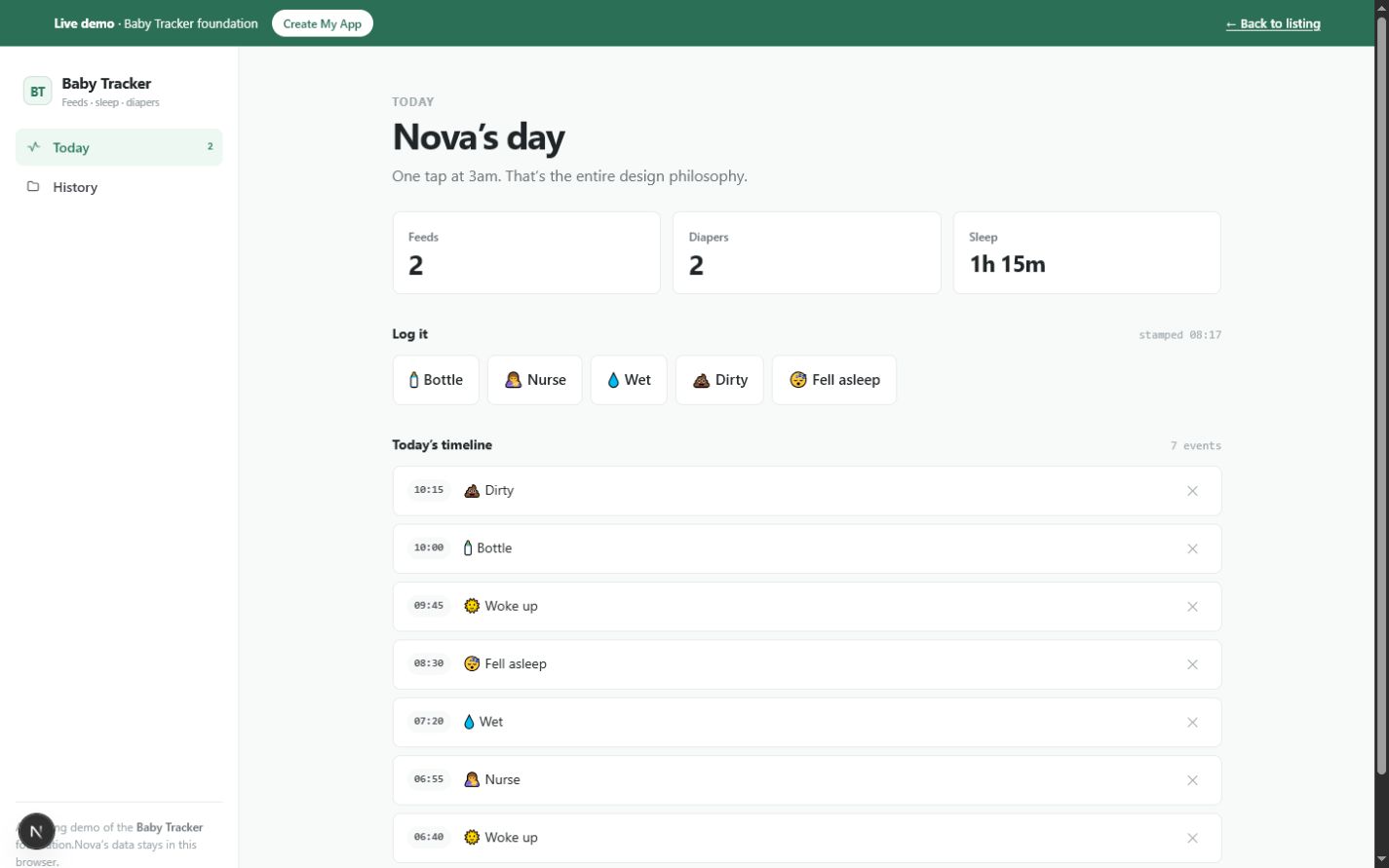
Baby Tracker today view showing feed, diaper, and sleep totals, one-tap event buttons, and a timestamped daily timelineOpen the working tool

Product preview

See Baby Tracker in use

These screens come from the working Foundationbase implementation.

Baby Tracker today view showing feed, diaper, and sleep totals, one-tap event buttons, and a timestamped daily timeline
Today's event log and totalsThe main view keeps capture actions above a timeline and summaries derived from today's records.
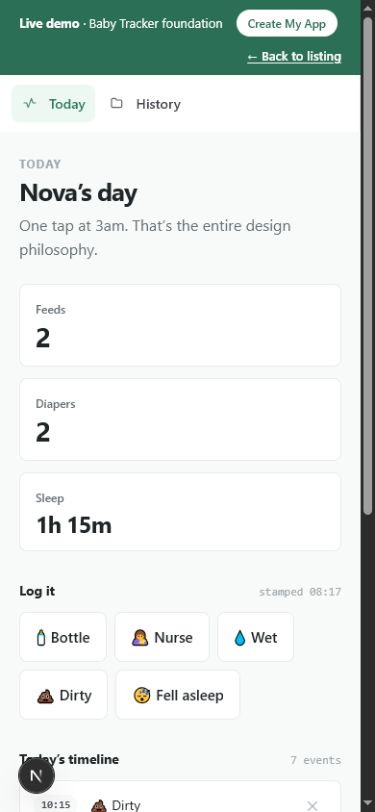
Mobile Baby Tracker today view with feed, diaper, and sleep totals and one-tap Bottle, Nurse, Wet, Dirty, and Sleep buttons
One-handed mobile captureLarge event buttons reduce the interaction to choosing the event at the current time.
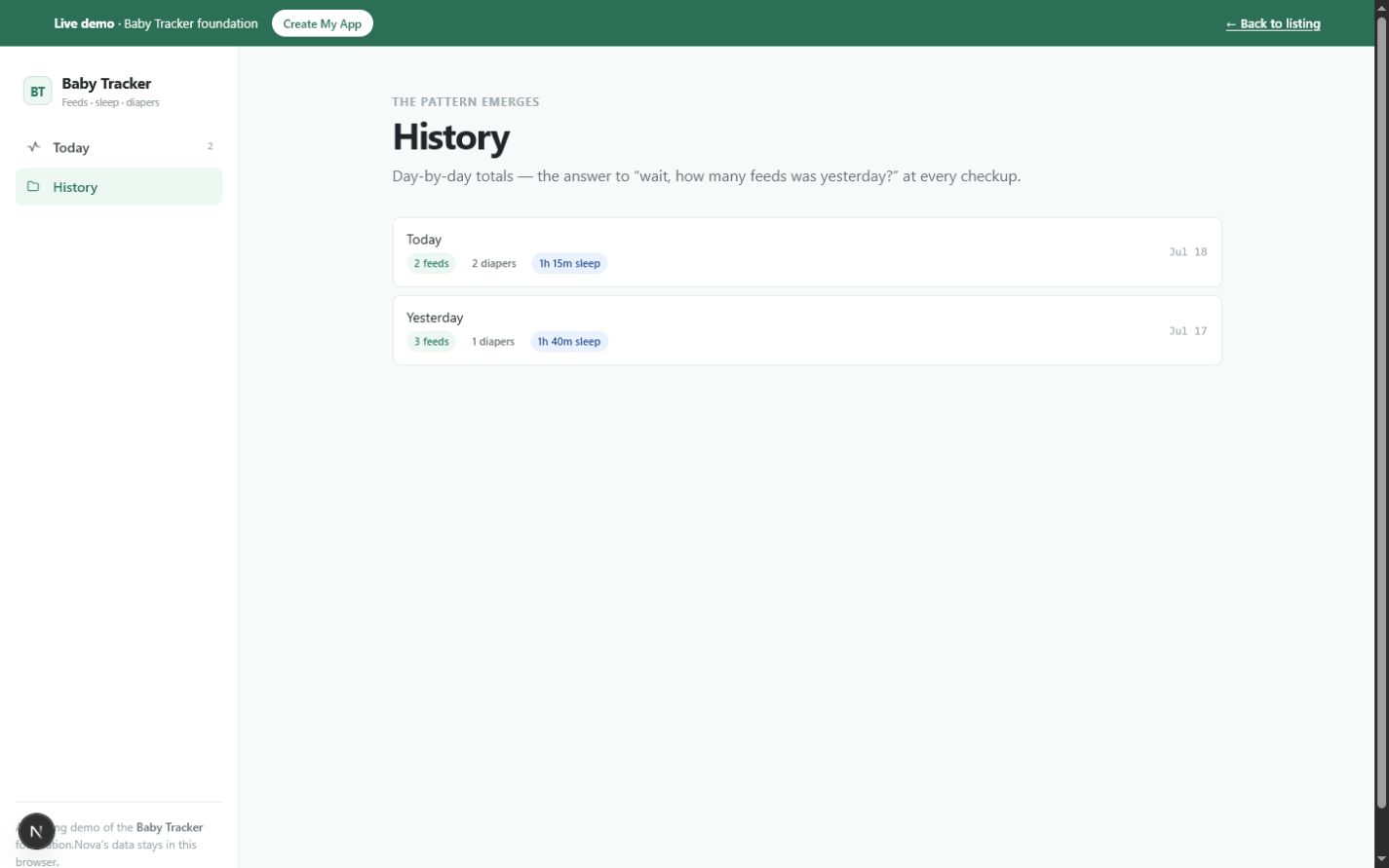
Baby Tracker history view listing recent dates with feed count, diaper count, and calculated sleep duration
Recent recorded-day summariesHistory groups events by date and derives the same three summary measures for each recorded day.

What this tool helps you do

A fast event timeline for feeds, diapers, and sleep

Care events are frequent, similar, and easy to forget. A free-form note takes too much effort during the event and makes daily counts difficult later. A larger tracking service may add accounts and shared infrastructure before a family knows which details it actually needs.

The Today view reduces capture to event buttons. A tap creates an event with the current local date and time. The interface derives counts and sleep duration from those stored events, while History groups up to 14 dates that contain records into compact daily summaries.

  • Log a bottle or nursing event at the current time
  • Distinguish wet and dirty diaper events
  • Mark when sleep starts and when the baby wakes
  • Review a reverse-chronological timeline for today
  • See feed and diaper counts derived from today's records
  • Calculate sleep duration from completed same-day sleep and wake pairs
  • Review summary totals for up to 14 recorded days

What is included

Features grounded in the working tool

One-tap event capture

Dedicated buttons create bottle, nursing, wet diaper, dirty diaper, sleep, or wake events without opening a form.

Why it matters: A caregiver can record the category with minimal attention during a busy moment.

Verified in: Today log buttons and EventType

Automatic local timestamp

Each new event receives today's local yyyy-mm-dd key and the current local hour and minute.

Why it matters: The timeline is usable immediately without typing a time for routine real-time capture.

Verified in: todayKey, nowTime, and log

Adaptive sleep or wake action

The tool inspects the most recent sleep-related event and shows Wake when the latest state is asleep; otherwise it shows Sleep.

Why it matters: The main action follows the current recorded state rather than displaying both choices all the time.

Verified in: Today asleep calculation and buttons array

Daily feed count

Bottle and nursing events are counted together for today's Feeds summary.

Why it matters: A quick total is derived from the timeline instead of maintained separately.

Verified in: Today feeds filter

Daily diaper count

Wet and dirty events are counted together for today's Diapers summary while remaining distinct in the timeline.

Why it matters: The overview stays compact without discarding event type.

Verified in: Today diapers filter

Paired sleep calculation

For one day, sleep and wake events are sorted by time; each wake following a sleep contributes the non-negative minute difference to the total.

Why it matters: Displayed sleep time comes from stored pairs rather than an entered summary.

Verified in: sleepMinutes

Deletable daily timeline

Today's events appear newest first with time and event label; any event can be removed from the list.

Why it matters: An accidental tap can be corrected and the totals recalculate from the remaining records.

Verified in: Today timeline

Recent recorded-day history

History selects up to 14 unique dates that have events and shows feed, diaper, and sleep summaries for each.

Why it matters: A caregiver can scan recent recorded days without opening every event.

Verified in: History day grouping and slice(0, 14)

How it works

From a one-tap event to a daily summary

The current implementation is optimized for real-time capture. It does not ask for amount, duration, side, notes, or a corrected time before saving.

  1. Open today's view

    The page shows the seeded baby name, current feed, diaper, and paired-sleep totals, and event buttons.

    The current day's context is visible before another event is added.
  2. Tap the event

    Choose Bottle, Nurse, Wet, Dirty, or the current Sleep/Wake action.

    A new event receives the current date and time and appears at the top of the timeline.
  3. Complete sleep pairs

    Tap Sleep when a period begins and Wake when it ends on the same day.

    Completed pairs contribute minutes to the daily sleep total.
  4. Correct accidental capture

    Remove an incorrect item from today's timeline. The current interface does not edit its type or timestamp.

    Counts and sleep totals recalculate from the remaining events.
  5. Review recent recorded days

    Open History to see up to 14 dates containing events, each summarized by feeds, diapers, and paired sleep time.

    The recent pattern is easier to scan than the full event stream.

Real use cases

Where this tool fits

Single-caregiver newborn log

For a parent using one phone browser

Situation: Feeds and diapers are frequent enough that the order and count blur together by the end of the day.

Workflow: Tap each event when it happens and check today's summary before a handoff or question.

Outcome: The day is reconstructed from timestamped events rather than memory alone.

Shared-device caregiver handoff

For two caregivers using the same device and browser profile

Situation: The next caregiver wants to see what was recorded earlier without reading a long message thread.

Workflow: Review today's timeline and totals on the shared browser, then continue logging new events there.

Outcome: A single local record provides continuity as long as everyone uses the same browser storage.

Recent-day summary before a visit

For a caregiver preparing general observations

Situation: You want a quick count of recorded feeds, diapers, and completed sleep pairs across recent days.

Workflow: Open History and scan up to 14 dates that contain events, noting that the app does not capture amounts or medical measurements.

Outcome: A concise personal log can support recall without being treated as a medical record.

Prototype for a richer family tracker

For a developer or product builder

Situation: You want to test the minimum event categories before adding quantities, editing, backup, accounts, or sync.

Workflow: Create the source copy, extend BabyEvent deliberately, migrate local data, and add validation for every new field.

Outcome: The richer tool starts from working capture, grouping, and summary calculations.

Who it is for

A focused fit, with clear limits

Ideal for

  • One caregiver logging on one browser
  • Families testing a minimal event vocabulary
  • People who value fast capture over detailed forms
  • Developers building an event-based family tracker

Especially useful for

  • Counting recorded feeds and diapers for the current day
  • Tracking same-day sleep and wake pairs
  • Correcting an accidental event by deleting it
  • Reviewing up to 14 days that contain records

Not the best fit if you need

  • Clinical, diagnostic, or regulated medical records
  • Tracking bottle volume, nursing side or duration, medication, pumping, growth, or symptoms in the current implementation
  • Overnight sleep that must be calculated accurately across midnight
  • Multiple children
  • Automatic sharing between caregivers on separate devices
  • Audit trails, immutable records, or automatic backups

Use it, install it, or make it yours

Choose the path that matches your goal

Use it now

Open the live tracker and tap an event at the time it happens. The seeded records and any new events live in the current browser; reset restores the demonstration dataset.

Create your copy

Download the source package and inspect the BabyEvent model, current-time capture, same-day sleep pairing, day grouping, and local-storage state.

Customize it with an agent

A coding agent can add editable timestamps, amounts, notes, pumping, growth, multiple children, or export. These are new data fields and workflows, not existing hidden capabilities.

Deploy your version

Publish the customized Next.js project to a compatible host. If separate caregivers need shared data, design authentication, authorization, encryption, conflict handling, and deletion before introducing a remote database.

Customization ideas

Change this tool without starting over

Baby Tracker's event model is a useful minimum, but family tracking becomes sensitive quickly. Visual and label edits are small; quantities, medical details, multiple caregivers, and cloud storage require explicit data design and privacy review.

Simple customization

  • Make the baby name editable instead of seeded in code
  • Reorder or rename event buttons
  • Change summary labels and colors
  • Start from an empty state rather than sample events

Functional customization

  • Add editable date and time with validation
  • Record bottle volume, nursing side and duration, or diaper notes
  • Add pumping and medication event types with clear non-medical disclaimers
  • Add versioned JSON export and import

Advanced customization

  • Support several children with separate timelines
  • Add encrypted family synchronization and caregiver roles
  • Generate a date-range PDF or CSV summary
  • Add opt-in reminders while avoiding duplicate notifications across caregivers

Prompts for Codex, Claude Code, Cursor, or another coding agent

Add editable date and time to Baby Tracker events. Let a caregiver correct an event from the timeline, validate local date and HH:MM input, preserve existing records, and recalculate daily summaries after edits.
Add bottle volume in milliliters and nursing duration in minutes to Baby Tracker. Show those fields only for relevant event types, migrate existing events with unknown values, and keep feed count separate from total recorded volume.
Add versioned JSON export and import to Baby Tracker. Validate every event id, type, date, and time; preview how many records will replace local data; and do not add an account or third-party service.

Technical details

Implementation facts

Framework
Next.js 15 and React 19
Language
TypeScript
License
MIT
Version
1.0.0
Storage
Browser localStorage, key Foundationbase.baby-tracker.v1
Account required
No
Offline support
Not currently included as a verified PWA/offline package
PWA installation
Not currently included
Export format
No export or import control in the current implementation
External APIs
None in the current implementation
Mobile support
Responsive interface with large event buttons designed for quick phone use
Last verified
July 18, 2026

Deployment options

  • A Next.js-compatible host
  • A compatible static deployment
  • Local development with npm run dev

Privacy and data behavior

What happens to your data

By default, Baby Tracker stores the baby name and event records in localStorage in the current browser. The component does not require an account or send those records to an application API. That does not make the data encrypted, backed up, synchronized, or suitable for medical use.

Stored data

  • Seeded baby name
  • Generated event identifier
  • Event type: bottle, nurse, wet, dirty, sleep, or wake
  • Local calendar date and local HH:MM time

Storage and network

Location: One JSON state object in the current browser profile under Foundationbase.baby-tracker.v1

Network: The Baby Tracker component performs no application data fetches. Normal site assets still load from the host serving the page.

Your controls

Delete: Delete individual events from today's timeline, reset to the seeded demonstration state, or clear site data in the browser. Older events are not individually exposed for deletion in History.

Export: No export or import method is included in the current implementation.

Data limitations

  • There is no automatic backup or recovery
  • Data does not synchronize between caregivers or devices
  • localStorage is not presented as encrypted
  • Anyone with access to the same unlocked browser profile may be able to view the log
  • Reset restores seeded sample records rather than an empty family record

Verification and known limitations

Checked against the implementation

Checks

  • BabyEvent model, current-time logging, and local-storage code inspected
  • Feed, diaper, and same-day sleep-pair calculations inspected
  • Today deletion and recent recorded-day grouping inspected
  • No amount, duration, edit, export, PWA, sync, or medical claim added
  • Production typecheck, build, route, structured-data, and responsive checks are part of the current pilot quality gate

Known limitations

  • Baby name is seeded and has no editor
  • Events cannot be edited or backdated; only today's events can be deleted from the visible timeline
  • Feeds are counts only, with no amount, side, or duration
  • Sleep calculation ignores an unmatched sleep and does not span midnight
  • History shows up to 14 dates with events, not a guaranteed continuous 14-day window
  • No export, backup, account, or caregiver synchronization

Foundationbase verification checks expected functionality, packaging, setup clarity, and common implementation concerns. It is not a professional security audit, accessibility certification, legal review, or guarantee of production suitability.

Comparison

Baby Tracker versus notes or a full family platform

The relevant questions are which events are captured, how time and totals are calculated, and whether caregivers can safely share the record.

DecisionFoundationbase toolStarting from scratchGeneric alternative
Capture speedOne tap creates a current-time eventYou design event forms and defaultsOften quick capture plus more fields
Feed detailCounts bottle and nursing eventsYou choose amount, side, and duration fieldsOften includes amounts and nursing timers
Sleep logicCompleted same-day sleep/wake pairsYou handle active sessions, midnight, edits, and overlapOften includes active timers and richer sleep reports
HistoryUp to 14 dates containing events with daily totalsYou choose retention and reportsOften long-term charts and exports
Caregiver sharingOnly when using the same browser storageYou design identity, permissions, and conflictsCommonly account-based
Data locationOne browser localStorage recordLocal or remote is your decisionUsually provider-hosted
CustomizationMIT source with a compact event modelFull flexibility with no baselineLimited to provider settings

FAQ

Questions about Baby Tracker

What can Baby Tracker record?

The current app records bottle, nursing, wet diaper, dirty diaper, sleep, and wake event types. Each tap stores the current local date and time.

Can it record bottle amount or nursing duration?

No. Feeds are event counts only. Amount, side, and duration are recommended data-model customizations and should remain optional for existing records during migration.

How is sleep time calculated?

Within one day, the app sorts sleep and wake events by time and adds the minutes from each sleep to the next wake. Unmatched sleep events and sleep spanning midnight are not included accurately.

Can two caregivers use it on separate phones?

Not with shared data in the current implementation. Each browser has separate localStorage. Real sharing requires accounts or another trusted synchronization design.

Where is the baby's data stored?

The baby name and events are stored in localStorage in the current browser profile under Foundationbase.baby-tracker.v1. The current component does not send them to an application backend.

Can I edit an incorrect event time?

No. Today's events can be deleted, but their type and timestamp cannot be edited. Editable date and time is a practical source customization.

Is this a medical record?

No. It is a personal event log and is not presented as a clinical system, diagnostic tool, regulated record, medical-device workflow, or substitute for professional care.

Can I export the history for a checkup?

No export is currently included. History can be read on screen, but a date-range PDF, CSV, or JSON backup must be added before claiming export support.

Start from something real

Start a simple baby event log

Use the one-tap tracker in this browser, or take the source and add the fields, corrections, backups, and caregiver model your family actually needs.