Personal · Daily tracker

Open Source Habit Tracker

Mark the habit you actually did and let the history—not guilt or points—show the pattern.

Habit Tracker is a small daily check-in tool for people who want an honest view of consistency. Add a habit, toggle completion across the last seven days, and review current streak, best streak, and rolling 30-day activity. This Foundationbase implementation stores one simple habit array in the current browser, requires no account, and provides source you can adapt into a routine coach, monthly tracker, or scheduled-habit system.

  • No account required
  • Check-ins stay in this browser
  • Seven-day editable grid
  • 30-day statistics
  • MIT licensed
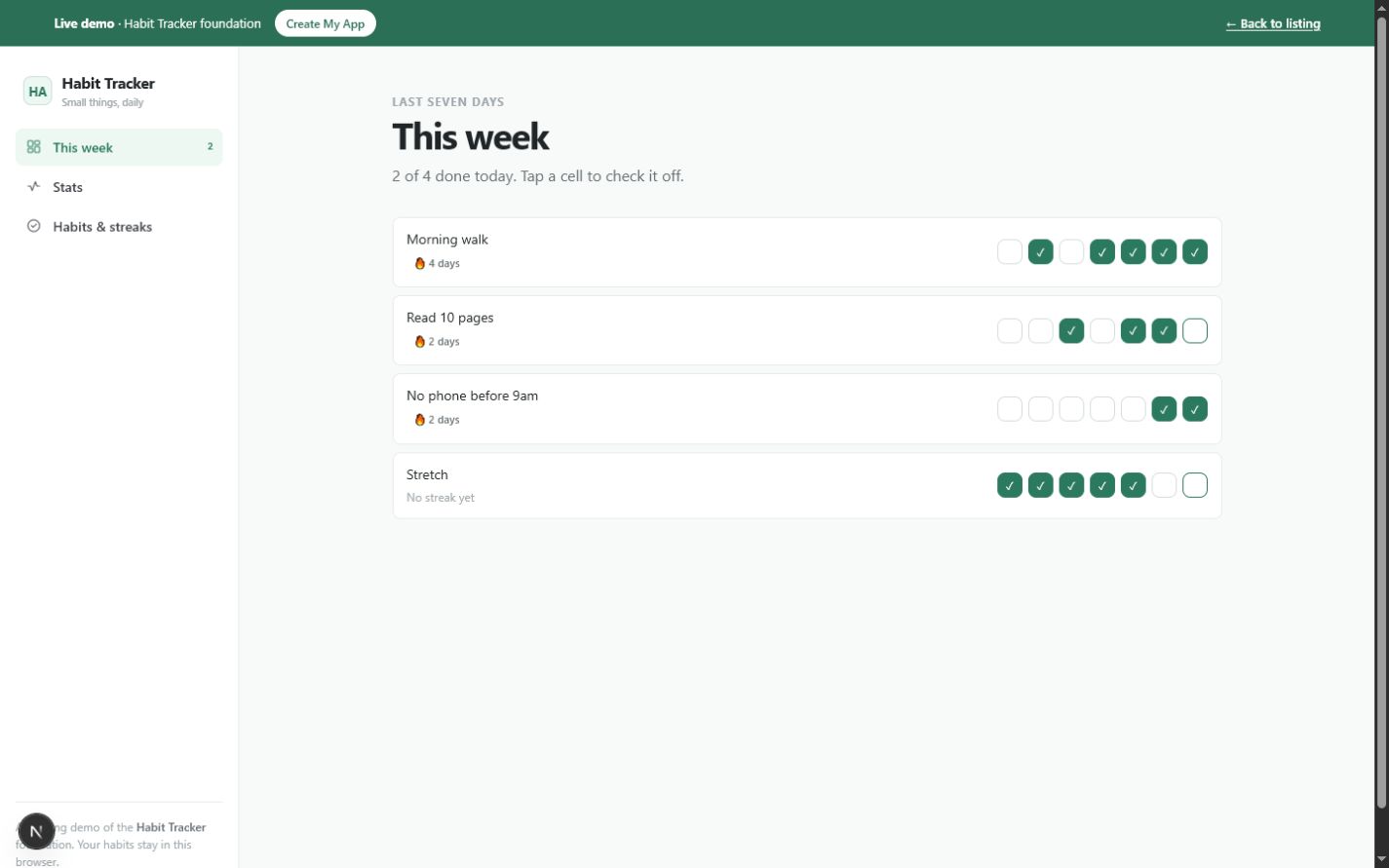
Habit Tracker week view showing four habits, seven daily checkboxes, current streak badges, and today's completion summaryOpen the working tool

Product preview

See Habit Tracker in use

These screens come from the working Foundationbase implementation.

Habit Tracker week view showing four habits, seven daily checkboxes, current streak badges, and today's completion summary
Seven-day check-in gridEvery cell corresponds to a real date key in the habit's completion history.
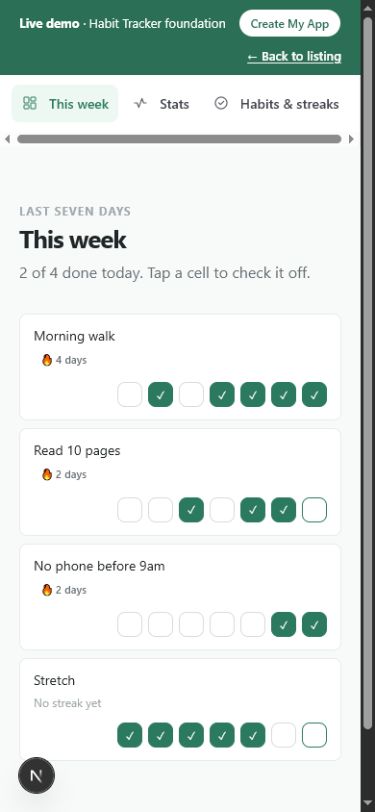
Mobile Habit Tracker week view with habit names, streak labels, and seven compact daily checkboxes
One-tap check-ins on mobileThe recent-week grid stays available on a narrow screen for quick daily use.
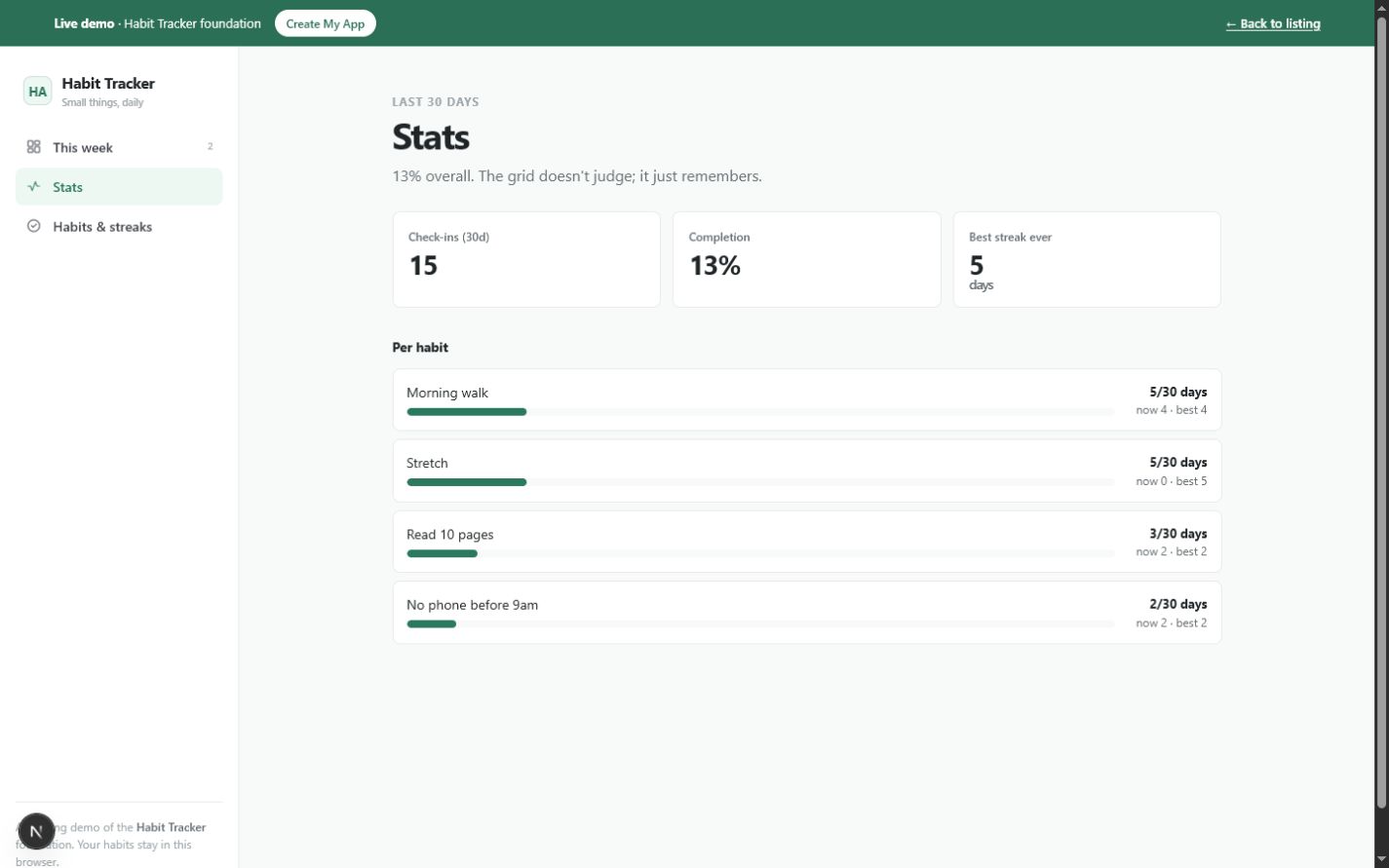
Habit Tracker statistics view showing 30-day check-ins, completion percentage, best streak, and per-habit progress
Rolling 30-day statisticsThe summary and per-habit bars are calculated from stored completion dates.

What this tool helps you do

A compact completion record for daily habits

A reusable checklist can say what should happen today, but it does not show whether the behavior happened yesterday or how a pattern developed. At the other extreme, points, social competition, and complex goal systems can make a small routine feel like another product to manage.

Each habit contains only a name and the date keys on which it was completed. The interface turns that history into a seven-day grid, a current streak, a best streak, total check-ins, and a rolling 30-day completion rate. There are no generated achievements or invented trends.

  • Maintain a short list of habits worth checking
  • Mark today or correct a check-in from the previous six days
  • See the current consecutive-day streak for each habit
  • Compare current and best streaks
  • Review check-in count and completion rate across the last 30 days
  • Remove a habit and its associated history when it no longer belongs

What is included

Features grounded in the working tool

Seven-day check-in grid

Each habit displays today and the previous six dates as individual toggle buttons.

Why it matters: Daily use is fast, and a recently missed or mistaken check-in can be corrected without editing raw data.

Verified in: WeekGrid date generation and toggle

Real date-key history

A completion is stored as a yyyy-mm-dd value in the habit's done array, not as a visual counter.

Why it matters: Streaks and statistics can be recalculated from the actual history.

Verified in: Habit type and useLocalState

Current streak calculation

The tracker counts backward from today when completed, or yesterday when today is not yet complete, until it reaches a missing date.

Why it matters: A current run remains meaningful during the day before the next check-in is made.

Verified in: streak function

Best streak calculation

The app sorts completion dates and finds the longest sequence of consecutive days for each habit.

Why it matters: Past consistency remains visible even after a current streak ends.

Verified in: bestStreak function

Rolling 30-day completion

For each habit, the tracker counts completion dates from 29 days ago through today and displays days completed out of 30.

Why it matters: The recent pattern is visible without relying only on a fragile streak.

Verified in: last30Count and HabitStats

Overall activity summary

The Stats view totals all 30-day check-ins, divides by habits times 30 for an overall rate, and shows the largest best streak.

Why it matters: A small dashboard gives context across the whole habit list.

Verified in: HabitStats aggregate calculations

Minimal habit management

Add a habit from one name field or delete a habit and all completion dates attached to it.

Why it matters: The list can stay short enough to remain usable.

Verified in: Manage view

Local browser persistence

The habit array is serialized to one versioned localStorage key and restored in the same browser.

Why it matters: The tracker needs no account or database while keeping its storage model easy to customize.

Verified in: Foundationbase.habit-tracker.v1 and useLocalState

How it works

From a habit name to a measurable recent pattern

The implemented loop is intentionally small: define, check in, inspect, and prune.

  1. Add a habit

    Open Habits & streaks, enter a short name, and add it to the existing list.

    The new habit begins with an empty completion history.
  2. Check in on the recent week

    Tap today's cell when the habit is done, or toggle one of the six preceding dates to correct recent history.

    That date is added to or removed from the habit's done array.
  3. Read the current streak

    The week and management views calculate consecutive completion days from the stored date keys.

    You see continuity without manually maintaining a counter.
  4. Review 30-day statistics

    Open Stats to compare check-in count, overall rate, best streak, and per-habit recent activity.

    A broader pattern can balance the all-or-nothing feeling of a streak.
  5. Prune the list

    Delete habits that are no longer useful. The current app removes the habit and its history immediately.

    The tracker stays focused, though deletion has no undo.

Real use cases

Where this tool fits

A small morning routine

For an individual

Situation: You want to track a few concrete actions such as walking, stretching, or reading without planning a whole day.

Workflow: Keep each action as a habit, tap today's cells, and glance at the recent-week pattern.

Outcome: The routine remains visible without becoming a complex task system.

Consistency beyond a streak

For someone rebuilding a routine

Situation: A missed day makes a single streak feel discouraging even when the last month was mostly consistent.

Workflow: Use current streak for continuity and the 30-day completion count for broader context.

Outcome: Recent behavior is judged from more than one number.

A private coaching prototype

For a coach

Situation: You want to test a simple habit model and language before adding clients, reminders, or shared data.

Workflow: Create a source copy, group or rename habits, adjust supportive copy, and add only the fields needed for the method.

Outcome: The prototype begins with real history and statistics rather than static mockups.

A starter project for tracker logic

For a developer learning React

Situation: You need a small domain model with persistence and derived statistics that is understandable in one component.

Workflow: Inspect Habit, toggle, streak, bestStreak, and last30Count, then add a scoped schedule or backup feature.

Outcome: A concrete tracker becomes the base for learning or experimentation.

Who it is for

A focused fit, with clear limits

Ideal for

  • People tracking a few daily yes-or-no habits
  • Anyone who wants a quiet private completion grid
  • Coaches prototyping a small routine tracker
  • Developers who want an inspectable habit-history model

Especially useful for

  • Correcting check-ins from the last week
  • Comparing current and best streaks
  • Using a 30-day rate alongside streaks
  • Starting from a single-array local data model

Not the best fit if you need

  • Habits scheduled only on selected weekdays in the current implementation
  • Quantity goals such as glasses, minutes, or repetitions
  • Push reminders or operating-system notifications
  • Automatic synchronization or shared accountability
  • Medical adherence or regulated health records
  • Long-term charts, notes, categories, and archived habits without customization

Use it, install it, or make it yours

Choose the path that matches your goal

Use it now

Open the live tracker, toggle the seeded habits, add your own, or reset the demonstration state. Changes persist in the same browser profile.

Create your copy

Download the source package and inspect the compact Habit type, date helpers, check-in grid, statistics, and local-storage hook.

Customize it with an agent

Ask a coding agent for weekday schedules, quantity targets, a monthly view, archive, export, or reminders. Each adds new behavior beyond the current simple date-array model.

Deploy your version

Publish the customized Next.js project to a compatible host and use its stable URL as your own tracker. Add a manifest and service worker before presenting the copied version as installable or offline-capable.

Customization ideas

Change this tool without starting over

The current model is deliberately narrow: each habit is a name plus completion dates. Preserve that simplicity for visual changes, or version and migrate the stored data when schedules, quantities, notes, or archive state are introduced.

Simple customization

  • Replace the seeded habits with your routine
  • Change streak and completion language
  • Adjust grid colors and density
  • Start the displayed week on a different day

Functional customization

  • Add weekday schedules so unscheduled days do not break streaks
  • Add a monthly calendar view
  • Add notes or a one-to-five rating per check-in
  • Add JSON export, validated import, and an explicit empty reset

Advanced customization

  • Add opt-in local notifications or calendar reminders
  • Create encrypted multi-device synchronization
  • Add coach and client sharing with permissions
  • Import selected health or activity data with clear consent

Prompts for Codex, Claude Code, Cursor, or another coding agent

Add weekday schedules to Habit Tracker. A habit can run every day or on selected weekdays. Update streak and 30-day completion calculations so unscheduled days do not count as misses, and migrate existing local habits to every day.
Add JSON backup and restore to Habit Tracker. Export habit names and completion dates with a schema version, validate every date and id on import, preview replacement, and keep the app account-free.
Add a monthly calendar view to Habit Tracker using the existing yyyy-mm-dd done arrays. Do not replace the seven-day quick-check view, and keep keyboard labels descriptive for each habit and date.

Technical details

Implementation facts

Framework
Next.js 15 and React 19
Language
TypeScript
License
MIT
Version
1.0.0
Storage
Browser localStorage, key Foundationbase.habit-tracker.v1
Account required
No
Offline support
Not currently included as a verified PWA/offline package
PWA installation
Not currently included
Export format
No export or import control in the current implementation
External APIs
None in the current implementation
Mobile support
Responsive browser interface with compact seven-day controls
Last verified
July 18, 2026

Deployment options

  • A Next.js-compatible host
  • A compatible static deployment
  • Local development with npm run dev

Privacy and data behavior

What happens to your data

By default, Habit Tracker stores habit names and completion dates in localStorage in the current browser. The component does not require an account or send check-in records through an application API. Local storage is a device boundary, not a backup or encryption guarantee.

Stored data

  • Generated habit identifier
  • Habit name
  • Array of completion dates in yyyy-mm-dd form

Storage and network

Location: One JSON state object in the current browser profile under Foundationbase.habit-tracker.v1

Network: The Habit Tracker component performs no application data fetches. Normal site assets still load from the host serving the page.

Your controls

Delete: Delete a habit to remove its name and history immediately, reset to restore sample habits, or clear the site's browser data.

Export: No export or import method is included in the current implementation.

Data limitations

  • Deleted habits have no undo
  • There is no automatic backup or recovery
  • Data does not synchronize between browsers or devices
  • localStorage is not presented as encrypted
  • Reset restores seeded demonstration habits rather than an empty tracker

Verification and known limitations

Checked against the implementation

Checks

  • Habit model, seven-day toggles, and local-storage code inspected
  • Current streak, best streak, and rolling 30-day calculation code inspected
  • Habit creation and deletion behavior inspected
  • No reminder, export, import, PWA, or offline claim added
  • Production typecheck, build, route, structured-data, and responsive checks are part of the current pilot quality gate

Known limitations

  • Every habit is treated as daily
  • No quantity, duration, note, category, or archive fields
  • No reminders, notification scheduling, or calendar integration
  • No export, import, or cross-device sync
  • Deletion is immediate and has no undo
  • Overall completion treats every habit as expected on all 30 days

Foundationbase verification checks expected functionality, packaging, setup clarity, and common implementation concerns. It is not a professional security audit, accessibility certification, legal review, or guarantee of production suitability.

Comparison

Habit Tracker versus a checklist or larger habit platform

The useful comparison is how each option records time, calculates consistency, and handles data ownership.

DecisionFoundationbase toolStarting from scratchGeneric alternative
Habit modelA name and exact completion datesYou choose schedule, goal, and history fieldsOften includes categories, schedules, goals, and reminders
Recent check-inEditable seven-day date gridYou build date navigation and togglesUsually available with product-specific UX
Streak logicCurrent and best consecutive calendar daysYou define edge cases and test themMay account for schedules, freezes, or grace days
Broader trendRolling 30-day counts and rateYou design summary windowsOften richer charts and reports
RemindersNot includedYou choose browser, native, email, or calendarCommonly included
Data locationOne browser localStorage recordYou choose local or remoteUsually cloud account data
CustomizationMIT source and small date-array modelFull freedom without working behaviorLimited to exposed settings

FAQ

Questions about Habit Tracker

How does the habit streak work?

The app counts consecutive stored completion dates backward. If today is complete, it starts today; otherwise it starts yesterday. It stops at the first missing calendar day.

Can I track habits that only happen on certain weekdays?

Not accurately in the current implementation. Every habit is treated as daily, so a scheduled day off would interrupt a streak. Weekday schedules require a model and calculation change.

Where are my habits stored?

Habit names and completion dates are stored in localStorage in the current browser profile under Foundationbase.habit-tracker.v1.

Can I export my habit history?

No. The current app has no export or import control. JSON backup with validation is a recommended customization before relying on the tracker for long-term records.

Does it send habit reminders?

No. It does not schedule browser, push, email, or calendar notifications. The tracker records check-ins only when you open and use it.

Can I install it as a PWA?

The current Habit Tracker does not have a dedicated verified manifest and service-worker package, so this page does not present it as installable or offline-capable.

Can I change it into a monthly or routine tracker?

Yes, by modifying the source. A monthly calendar can reuse the existing date-key history; grouped routines or schedules need new fields and migration defaults for existing habits.

Start from something real

Build from a ready-made habit tracker

Use the working seven-day tracker, or take the source and add the schedules, views, backups, and supportive language that fit your routine.