Finance · Billing document generator

Open Source Invoice Generator

Turn services, quantities, rates, and tax into a numbered document with a clear next state.

Invoice & Estimates is a focused billing-document tool for freelancers and small service businesses. Create an estimate or invoice, enter a client and line items, calculate subtotal and percentage tax automatically, then move the record through its available states. This Foundationbase version stores documents in the current browser, converts an approved estimate to an invoice, and uses the browser's print dialog for paper or PDF output.

  • No account required
  • Calculated line-item totals
  • Estimate-to-invoice flow
  • Browser print and PDF
  • MIT licensed
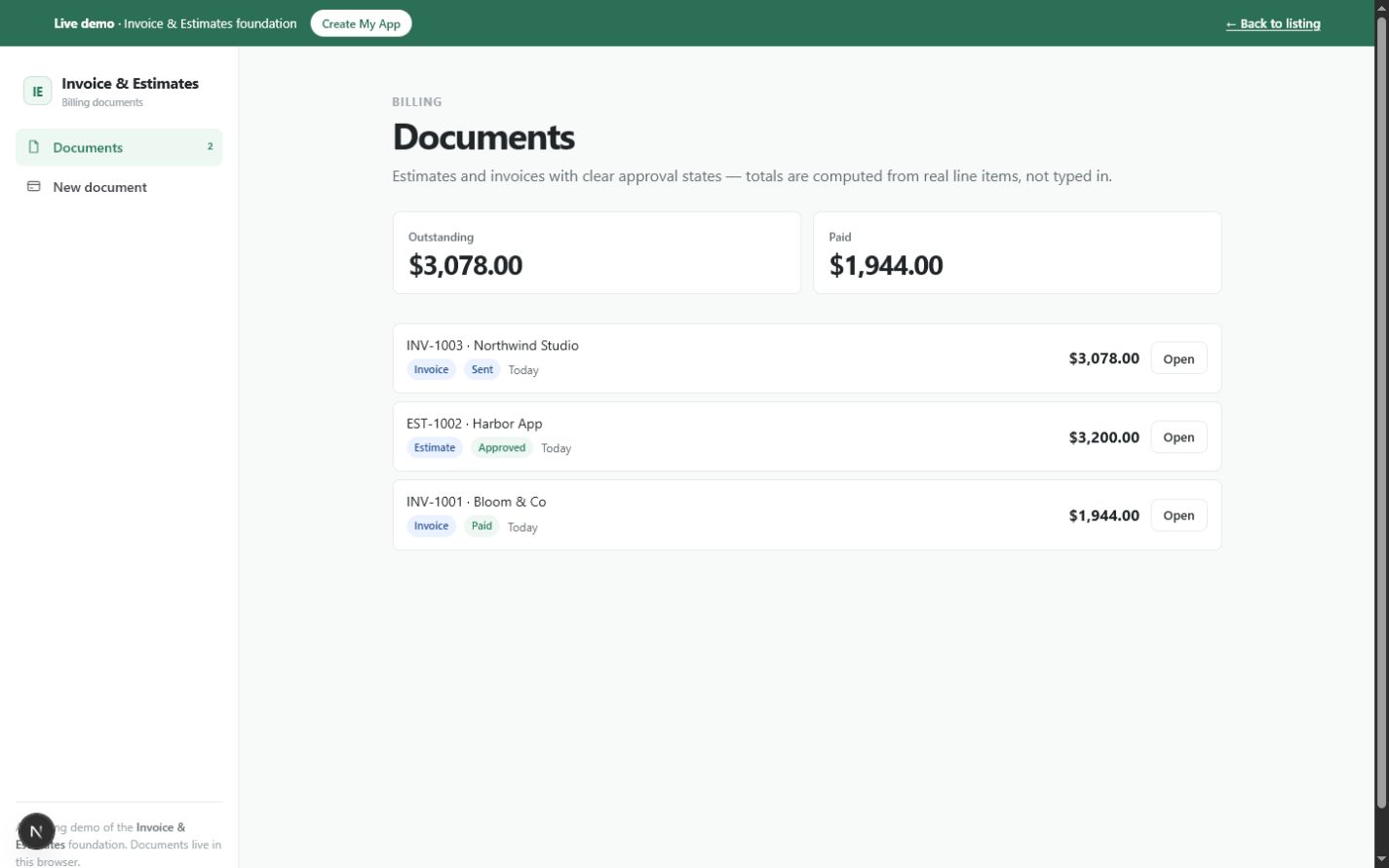
Invoice and estimate document library showing outstanding and paid totals, document numbers, clients, statuses, dates, and calculated amountsOpen the working tool

Product preview

See Invoice & Estimates in use

These screens come from the working Foundationbase implementation.

Invoice and estimate document library showing outstanding and paid totals, document numbers, clients, statuses, dates, and calculated amounts
Billing document libraryThe list summarizes locally stored estimates and invoices and calculates outstanding and paid totals from their current states.
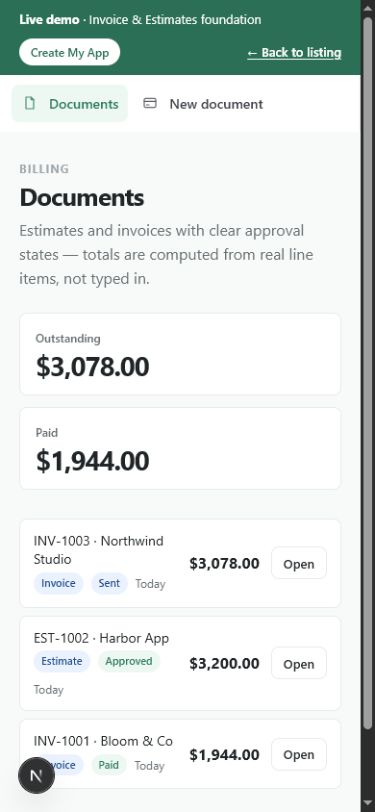
Mobile invoice and estimate document list with financial totals and status tags
Billing records on a narrow screenThe responsive browser view keeps document identity, status, total, and navigation available on a phone.
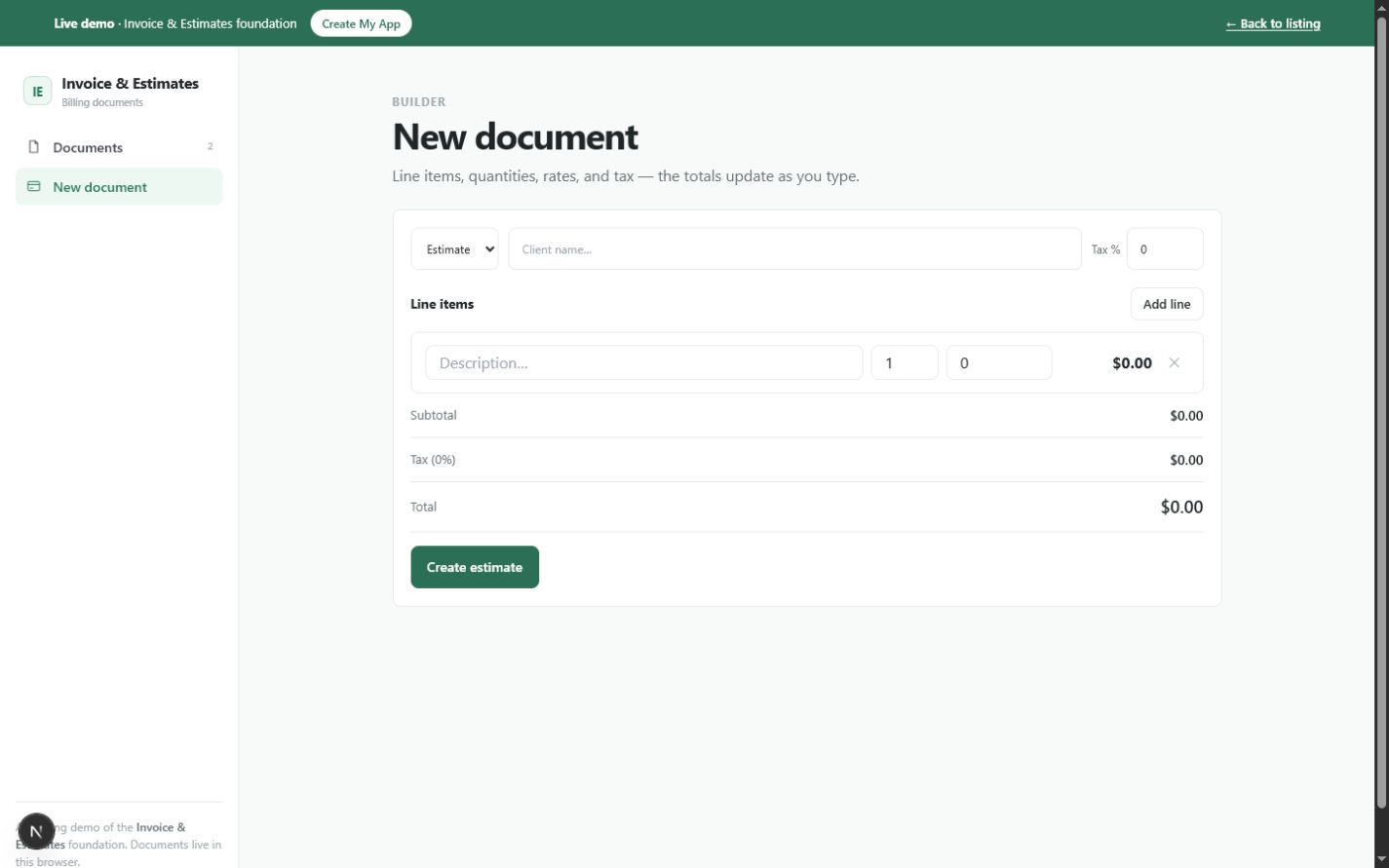
Invoice and estimate builder with document type, client, tax percentage, editable line items, subtotal, tax, and total
Line-item document builderQuantities, rates, and tax feed live subtotal and total calculations before the document is created.

What this tool helps you do

A working estimate and invoice workflow, not an accounting platform

Copying an old document or editing a spreadsheet invites stale client details, broken formulas, and manually typed totals. Larger accounting products solve more problems, but they also introduce accounts, ledgers, payment providers, and configuration that may be outside a simple document prototype.

This tool represents each billing document as a client name, type, automatic number, line items, tax rate, date, and status. The interface calculates amounts from quantity and rate, stores the result locally, and exposes only the state changes implemented for estimates and invoices.

  • Create either an estimate or an invoice from one builder
  • Add multiple services or products with quantity and rate
  • Calculate subtotal, percentage tax, and total automatically
  • Assign sequential EST or INV numbers
  • Record sent, approved, declined, and paid states where applicable
  • Convert an approved estimate into a draft invoice
  • Print the document or save it as PDF through the browser

What is included

Features grounded in the working tool

Estimate and invoice modes

Choose the document type in the builder. The created record receives an EST or INV prefix with the next shared number.

Why it matters: One data model supports the two common stages of a service billing workflow.

Verified in: DocKind, Builder, and nextNumber

Editable line items

Add or remove rows, describe the work, and enter quantity and rate for each item. Empty descriptions are excluded when the document is created.

Why it matters: The document total is grounded in the work being billed rather than a single manually typed amount.

Verified in: LineItem type and Builder item controls

Live subtotal and tax calculation

The builder multiplies quantity by rate for each row, sums the subtotal, and applies the entered percentage tax to produce the total.

Why it matters: Users can see the financial effect of line-item and tax changes before saving the document.

Verified in: subtotal, total, and builder calculations

Sequential document numbering

A shared next-number counter generates EST- or INV-prefixed numbers and advances after each new document or estimate conversion.

Why it matters: New records receive a predictable identity without asking the user to type one.

Verified in: State.nextNumber and create/convert functions

Type-specific status actions

Draft records can be marked sent. Sent estimates can be approved or declined. Sent invoices can be marked paid.

Why it matters: The action set follows the current document type and state instead of displaying every transition at once.

Verified in: DocStatus and DocDetail conditional actions

Approved estimate conversion

Convert an approved estimate into a draft invoice with a new INV number while retaining the client, items, tax, and date on the same record.

Why it matters: Accepted work can move into billing without re-entering line items.

Verified in: convertToInvoice

Outstanding and paid summaries

The document list totals sent or approved invoices as outstanding and all paid documents as paid.

Why it matters: The opening view provides a small operational snapshot derived from stored documents.

Verified in: DocList outstanding and paid reducers

Browser print and PDF path

Every document detail exposes Print / PDF, which opens the browser's native print workflow.

Why it matters: A user can print or choose a PDF destination without a server-side document service.

Verified in: window.print in DocDetail

How it works

From scoped work to a printable billing record

The tool's real workflow is a document state machine with client text and calculated line items—not client management, payment processing, or accounting reconciliation.

  1. Choose estimate or invoice

    Open New document and select the type that matches whether the work is proposed or already billable.

    The future record will use the appropriate number prefix.
  2. Enter the client and work

    Add the client name, one or more line descriptions, quantities, rates, and an optional tax percentage.

    The builder calculates subtotal, tax, and total as values change.
  3. Create the numbered record

    Create the document once a client and at least one described line exist.

    A draft document is stored in the browser and opened for review.
  4. Advance the document state

    Mark a draft sent. For an estimate, record approval or decline; convert an approved estimate to a new draft invoice. For an invoice, mark payment when received.

    The available actions and summary totals reflect the stored state.
  5. Print or save the result

    Use Print / PDF from the document view and choose the printer or PDF destination supplied by the browser and operating system.

    The record can leave the browser as a paper copy or user-created PDF.

Real use cases

Where this tool fits

Freelance project estimate

For a freelancer

Situation: A prospective client needs a written scope with several services and a tax-inclusive total.

Workflow: Create an estimate, add the scoped lines, mark it sent, record approval, and convert it to an invoice when work proceeds.

Outcome: The accepted scope moves into billing without retyping the work.

Consulting invoice

For an independent consultant

Situation: A completed engagement needs a numbered invoice with hours or deliverables and a clear total.

Workflow: Choose invoice, enter the client and line items, verify tax, create the record, and print or save it as PDF.

Outcome: A consistent billing document is produced from calculated inputs.

Small service-business prototype

For a local service operator

Situation: The business wants to test terminology and status flow before adopting accounting or payment integrations.

Workflow: Customize labels, default tax, services, and print branding in a source copy while retaining the existing calculation model.

Outcome: A real workflow prototype informs the later production architecture.

Billing workflow teaching example

For a developer or student

Situation: You need a compact example of linked UI, calculations, persisted records, and conditional state transitions.

Workflow: Inspect BillingDoc, LineItem, total calculations, and DocDetail actions, then add one scoped capability.

Outcome: The code offers a concrete base for learning or extending a document state machine.

Who it is for

A focused fit, with clear limits

Ideal for

  • Freelancers issuing straightforward estimates and invoices
  • Consultants billing line-item work
  • Small service businesses prototyping a document workflow
  • Developers who need a compact invoice-builder foundation

Especially useful for

  • Calculating totals from quantity and rate
  • Converting an approved estimate into an invoice
  • Testing document statuses before adding a backend
  • Using native browser printing instead of a PDF service

Not the best fit if you need

  • Bookkeeping, double-entry accounting, bank reconciliation, or financial reporting
  • Automatic email delivery or client authentication
  • Real payment links or payment processing in the current implementation
  • Legally compliant invoice requirements across all jurisdictions
  • Multiple currencies, discounts, deposits, or recurring invoices
  • Automatic backup or cross-device synchronization

Use it, install it, or make it yours

Choose the path that matches your goal

Use it now

Open the live tool, create a draft estimate or invoice, move it through the implemented states, and use your browser's print destination. Records are saved in this browser.

Create your copy

Download the MIT-licensed source package. The central component contains the billing types, calculations, document builder, list summaries, state actions, and print boundary.

Customize it with an agent

Ask a coding agent to add addresses, due dates, discounts, branded print CSS, deletion, export, or a real provider integration. Payment and email behavior must be implemented before it is claimed.

Deploy your version

Publish the customized Next.js project to a compatible host. If you add accounts, client approval, payment, or document delivery, move sensitive operations to trusted server code and document the new data flow.

Customization ideas

Change this tool without starting over

The existing BillingDoc and LineItem types make document changes concrete. Styling and terminology are small edits; payments, authenticated approval, and accounting integration are architectural work with new security and compliance obligations.

Simple customization

  • Add business name, logo, and contact details to the print view
  • Change USD formatting to one chosen currency
  • Rename estimate, invoice, client, or tax labels
  • Preload a short list of common services and rates

Functional customization

  • Add due dates, notes, discounts, and payment terms
  • Add document duplication and deletion with confirmation
  • Create JSON or CSV export and validated import
  • Add print-specific CSS for a polished one-page PDF

Advanced customization

  • Generate signed PDFs on a server
  • Add authenticated client approval with an audit trail
  • Create real Stripe payment links and webhook-based paid status
  • Integrate with an accounting ledger or tax service

Prompts for Codex, Claude Code, Cursor, or another coding agent

Add due dates and percentage or fixed discounts to Invoice & Estimates. Update BillingDoc, calculate subtotal, discount, tax, and total in a documented order, migrate existing local records, and show every amount in the print view.
Add document duplication and deletion to Invoice & Estimates. Duplicates must receive a new number and draft status; deletion must require confirmation and update the outstanding and paid summaries.
Replace the placeholder payment-link alert with a real Stripe integration. Create payment links only on trusted server code, store no secret in the browser, verify webhooks before marking an invoice paid, and document the new network and privacy behavior.

Technical details

Implementation facts

Framework
Next.js 15 and React 19
Language
TypeScript
License
MIT
Version
1.0.0
Storage
Browser localStorage, key Foundationbase.invoice-estimates.v1
Account required
No
Offline support
Not currently included as a verified PWA/offline package
PWA installation
Not currently included
Export format
Browser Print / PDF only; no structured data export or import
External APIs
None; Stripe/payment behavior is not implemented
Mobile support
Responsive browser interface; complex line-item entry is more comfortable on a wider screen
Last verified
July 18, 2026

Deployment options

  • A Next.js-compatible host
  • A compatible static deployment
  • Local development with npm run dev

Privacy and data behavior

What happens to your data

By default, Invoice & Estimates stores billing documents in localStorage in the current browser. It does not create an account, send documents, contact a payment provider, or transmit client and line-item data through an application API.

Stored data

  • Document type, generated number, client name, date, tax rate, and status
  • Line-item descriptions, quantities, rates, and generated identifiers
  • The next shared document number

Storage and network

Location: One JSON state object in the current browser profile under Foundationbase.invoice-estimates.v1

Network: The current component performs no data API calls. The payment-link action displays a placeholder alert; it does not contact Stripe or another provider. Normal site assets still load from the host.

Your controls

Delete: The current interface has no individual document deletion. Reset replaces all records with seeded sample documents; clearing site data removes the localStorage record.

Export: Print / PDF uses the browser's print dialog. There is no JSON, CSV, accounting, or import workflow.

Data limitations

  • There is no automatic backup or recovery
  • Client and billing data do not sync between browsers or devices
  • localStorage is not presented as encrypted
  • Reset restores demonstration records rather than an empty dataset
  • A printed PDF is outside the app's later deletion control

Verification and known limitations

Checked against the implementation

Checks

  • BillingDoc, LineItem, numbering, and local-storage code inspected
  • Subtotal, tax, total, outstanding, and paid calculations inspected
  • Estimate approval, decline, conversion, and invoice paid transitions inspected
  • Print/PDF boundary and placeholder payment alert inspected
  • No payment, email, client-portal, import, or structured-export claim added

Known limitations

  • No real payment-link creation or payment processing
  • No email delivery or authenticated client approval
  • No client address, issuer identity, due date, terms, discount, currency choice, or recurring invoice fields
  • No individual document deletion or editing after creation
  • No structured export/import or automatic backup
  • Tax behavior is a simple percentage and is not jurisdictional tax advice

Foundationbase verification checks expected functionality, packaging, setup clarity, and common implementation concerns. It is not a professional security audit, accessibility certification, legal review, or guarantee of production suitability.

Comparison

Invoice & Estimates versus a blank build or accounting suite

This comparison focuses on the billing workflow actually implemented: inputs, calculations, states, output, and missing integrations.

DecisionFoundationbase toolStarting from scratchGeneric alternative
Document inputsClient text, line descriptions, quantities, rates, and percentage taxYou define fields, validation, and editor behaviorOften includes customer, catalog, address, terms, and accounting fields
CalculationsSubtotal plus percentage tax in USDYou implement and test formula orderMay include discounts, multi-currency, and jurisdiction rules
Estimate workflowDraft, sent, approved or declined, then conversion to invoiceYou design states and allowed transitionsMay include client portals and e-signature
PDF outputBrowser Print / PDFYou choose browser or server renderingUsually generated and stored by the provider
Payment processingNot included; current button identifies an integration boundaryYou select and secure a providerOften integrated with transaction fees
AccountingNo ledger or reconciliationCan be scoped to exact needsOften a central capability
Data and accountsLocal browser state with no accountYou choose architectureProvider-hosted account and cloud data
CustomizationMIT source with a working document state modelFull freedom with no baselineLimited to settings, templates, and integrations

FAQ

Questions about Invoice & Estimates

Can this tool calculate tax?

Yes. Enter a percentage from the builder and the tool calculates tax as subtotal multiplied by that percentage. It does not implement jurisdiction-specific rules, exemptions, inclusive tax, or tax advice.

Can it create a PDF invoice?

It opens the browser's Print / PDF workflow. You can choose a PDF destination if the browser and operating system provide one. The app does not generate or store a server-side PDF file.

Does it accept online payments?

No. The current payment-link button only explains where a provider could be integrated. It does not create a link, contact Stripe, process money, or verify a payment.

Can an approved estimate become an invoice?

Yes. After a sent estimate is marked approved, Convert to invoice changes it into a draft invoice with a new INV number while retaining its client, line items, tax, and date.

Where are invoices and client names stored?

They are stored in localStorage in the current browser profile under Foundationbase.invoice-estimates.v1. There is no account or automatic remote backup.

Can I add my logo, address, and payment terms?

Not through the current form. Those are practical source customizations: add issuer and terms fields, render them in document detail, and include print-specific styling.

Is this accounting software?

No. It is a focused estimate and invoice workflow. It has no general ledger, bank reconciliation, receivables aging, compliance reporting, or accounting integration.

Can I use the source commercially?

The source is listed under the MIT license. Read the license included in the downloaded copy and evaluate any legal, tax, payment, and document requirements for your business before production use.

Start from something real

Create your next estimate or invoice

Use the working builder for a local document, or take the source and add the branding, terms, output, and integrations your real billing workflow requires.